1, Appearance differences
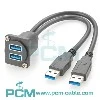
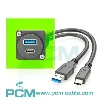
There is a noticeable difference in appearance between USB 2.0 and USB 3.0 ports. USB 2.0 ports are typically made of white or black plastic material and have a standard rectangular shape. The USB 3.0 port is made of blue plastic material, which is one of its most prominent features. In addition, the shape of the USB 3.0 port is also different, as it adopts a flatter design, making it smoother to insert into the device.
In addition to color and shape, USB 3.0 ports also differ from USB 2.0 in terms of the number of pins. The USB 2.0 port adopts a 4-pin design, while the USB 3.0 port adopts a 9-pin design. This design enables the USB 3.0 port to support higher data transfer rates and larger current output.
2, Performance comparison
There is also a significant difference in performance between USB 2.0 and USB 3.0 ports. The maximum transfer rate of USB 2.0 is 480Mbps, while the maximum transfer rate of USB 3.0 is as high as 5Gbps, which is more than 10 times that of USB 2.0. This means that using USB 3.0 ports can greatly improve the speed and efficiency of data transfer.
In addition to transmission speed, the USB 3.0 port also adopts more advanced power management technology. It can provide greater current output for devices, allowing them to receive more power support when connected. This is particularly important for devices that require high current, such as portable hard drives, external optical drives, etc.
In addition, USB 3.0 has introduced a new protocol to improve data processing efficiency. This makes USB 3.0 more stable and reliable during data transmission, reducing errors and losses during data transmission.
3, Application scenarios
Due to the differences in performance and appearance between USB 2.0 and USB 3.0 ports, they also have different application scenarios in practical applications. The USB 2.0 port is suitable for devices that do not require high data transfer speed, such as mice, keyboards, printers, etc. These devices usually only require simple data transmission and control operations, and the use of USB 2.0 ports is sufficient to meet the requirements.
The USB 3.0 port is more suitable for devices with high data transfer speed requirements, such as portable hard drives, external optical drives, high-definition cameras, etc. These devices require the transmission of large amounts of data or high-definition videos, and using USB 3.0 ports can greatly improve transmission speed and efficiency, saving users time and energy.

May 27, 2024
Leave a message
How to distinguish between USB 2.0 and 3.0 ports?
Send Inquiry