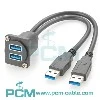
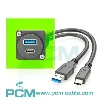
USB extenders can be very useful tools in specific situations, but to ensure their reliability, it is necessary to carefully select the appropriate device and understand its working principle and potential issues. When purchasing a USB extender, please consider factors such as signal quality, device compatibility, power supply, latency requirements, and brand quality. Only when selected and used correctly can the USB extender provide reliable connectivity and meet your needs. I hope this article can help you better understand the reliability issues of USB extenders and make wise choices.
Working principle of USB extender
Before discussing the reliability of USB extenders, we need to understand how they work. A USB extender is a device used to extend the distance of a USB connection. They typically consist of two main components: a transmitter and a receiver.
Transmitter: The transmitter is usually connected to a computer or USB host device and is responsible for converting USB signals into a suitable form for transmission, usually through network cables or optical fibers. The transmitter may also include some signal amplification and shaping functions to ensure that the signal remains intact during long-distance transmission.
Receiver: The receiver connects to a remote USB device and restores the signal transmitted through the transmission line to the original USB signal, so that the remote device can function properly.
This collaboration between the transmitter and receiver allows USB signals to be transmitted over long distances, but also introduces some potential reliability issues that we will discuss in detail in the following sections.
Reliability issues with USB extenders
Although USB extenders can provide convenience, they may also introduce some reliability issues. Here are some common problems and solutions:
Reduced signal quality: During long-distance transmission, USB signals may decay or be interfered with, resulting in unstable connections or reduced speed. To address this issue, some USB extenders are equipped with signal amplifiers and noise reduction technology to maintain signal quality.
Delay: Long distance transmission usually introduces a certain signal delay. Although this is not a problem for most applications, there may be some challenges for applications that require real-time data transmission.
Device compatibility: Compatibility issues with USB extenders may cause some USB devices to malfunction. When choosing a USB extender, it is important to ensure that it is compatible with the device you plan to connect to.
Power supply: Some USB devices require high current supply, and long-distance transmission may cause a decrease in current. In this case, you may need to use a USB extender with an external power adapter.
How to Choose a Reliable USB Extender
Choosing the appropriate USB extender is the key to ensuring reliability. Here are some selection criteria:
Signal quality: Check the technical specifications of the USB extender to ensure it supports the required signal quality and speed. Some high-quality USB extenders use advanced signal processing technology to improve reliability.
Device Compatibility: Confirm that the USB extender is compatible with your USB device. If you have multiple USB devices, it is recommended to choose a USB extender that supports multiple devices.
Power supply: If the USB device you are connecting requires additional power, choose a USB extender that provides appropriate power supply options.
Delay requirement: If your application requires low latency real-time data transmission, choose a USB extender with acceptable latency.
Brand and Quality: Choose well-known USB extenders as they typically provide higher reliability and quality assurance.
Application Scenarios of USB Extender
USB extenders are useful in many different application scenarios. The following are some common application scenarios:
Conference Room and Presentation: In a conference room, a USB extender can connect a computer to a projector, sound system, or other external devices for presentations and presentations.
Monitoring system: USB extender can be used to connect USB cameras or other monitoring devices to the monitoring center for real-time monitoring and recording.
Medical devices: In the medical field, USB extenders can be used to connect medical devices, enabling doctors to remotely monitor patient data.
Industrial automation: In industrial automation, USB extenders can be used to connect various sensors and control devices for remote monitoring and control.
Remote work: For remote workers, USB extenders can help them connect USB devices to remote computers, making work more convenient.