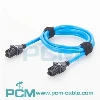
If your Cisco smart serial cable is not working, there are a few steps you can take to troubleshoot:
- Check the cable connection to ensure both ends are securely connected to the correct ports on your devices.
- Verify that both devices are powered on and configured to communicate via the smart serial interface.
- Test the cable with a different Cisco device to determine if the issue lies with the cable or the device.
- Ensure that the correct terminal settings (such as baud rate and data bits) are configured in your terminal software.
These troubleshooting steps should help resolve the most common connection issues related to Cisco smart serial cables.

You May Also Like

Smart Serial Crossover Cable CAB-SS-2626X

DB9 to RJ45 Console Cable

USB C Serial Console Cable

Smart Serial Cable Cisco ADA-SSC-GM

Smart Serial CAB-SS-X21MT X.21 Cable

Smart Serial 26 Pin to DB25 Router Cable