USB 2.0 A to Mini USB Industrial Camera Cable :
Features Applications And Selection Guide
Explore USB 2.0 A to Mini USB industrial camera cables for machine vision and automation. Learn about interface compatibility, data transfer, cable construction, shielding, installation, and selection. Find customization and wholesale options from cable manufacturers for camera to host integrations.
Product Introduction

What Is an USB 2.0 A To Mini USB Industrial Camera Cable ?
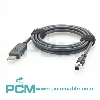
The USB 2.0 A to Mini USB industrial camera cable uses a USB Type A connector at one end and a Mini USB connector at the other. Depending on setup, straight or right angle connectors and shielded cable options are available.
It connects compatible industrial cameras to computers for image acquisition, display, analysis, storage and processing. Performance depends on the camera, host, software and supported USB modes.
What Affects USB 2.0 Industrial Camera Cable Performance?
A USB 2.0 A to Mini USB industrial camera cable connects a compatible camera to the host. USB 2.0 High Speed has a nominal 480 Mbps signaling rate, not guaranteed image throughput.
Performance depends on cable quality and length, connector termination, camera and host USB capabilities, resolution, frame rate, image format, and software. Test the setup for camera recognition, stable transfer, and continuous operation.

How to Select the Right USB 2.0 A to Mini USB Industrial Camera Cable ?
Select a USB 2.0 A to Mini USB cable; check the camera port and pinout. USB 2.0 High Speed has a nominal 480 Mbps signal rate; actual throughput varies. Choose straight or right-angled connectors to suit space, and cable length for routing, movement, and maintenance. Test the link before deployment.
Core Product Value

◆ Direct Connection with Matched Interfaces
The USB 2.0 A to Mini USB cable connects compatible industrial cameras and host computers directly. Its matched connectors reduce extra adapters and simplify installation, connection checks, and maintenance.
◆ Data Connectivity for Image Acquisition
This cable provides a USB data path from a compatible industrial camera to a host, transferring captured images for display, analysis, storage, and machine vision inspection across automation workflows.
◆ Shielding for Industrial Environments
Shielding helps limit electromagnetic interference entering the signal path. With proper termination and grounding, the cable supports reliable data connections in electrically noisy industrial environments.
◆ Strain Relief for Mechanical Protection
A well designed connector to cable transition and strain relief distribute stress during plugging and routing. This supports natural cable exit and reduces damage from sharp bends, pulling, or repeated handling.

Product Customization Capabilities
Connector Customization
Customize Type A and Mini USB ends, plug angles, and cable exit routing options.
Customized length
Set cable length for routing paths, equipment layout, and maintenance clearance.
Customized wire
Customize conductor size, insulation, and data pairs for the target USB mode.
Blocking customization
Choose foil or braid shielding and drain-wire options for grounding setup needs.
Jacket customization
Select jacket material, color, and flexibility for the installation environment.
OEM Bulk Production
Plan OEM labels, packaging, and batch tracking; confirm MOQs and delivery dates.
Product FAQ
Can This Cable Support Camera Image Acquisition ?
Yes, if the camera supports a compatible USB 2.0 connection. Actual results depend on interface mode, cable quality, image data volume, drivers, and acquisition software; test the complete setup.
Can This Cable Carry Both Data and Power ?
Yes, if the camera supports USB bus power and the host and cable meet its electrical needs. Confirm voltage and current requirements; connector type alone does not define power capacity.
Can This Cable Replace the Original Camera Cable ?
It may, if connector type, orientation, USB mode, length, shielding, and electrical requirements match. Verify the camera specifications and test a sample before replacing the original.
Why Is the Camera Not Detected or Unstable ?
Check connector fit, cable damage, USB mode, drivers, and capture software. Inspect routing, bends, shielding, and grounding; compare with a verified cable to isolate the cause.