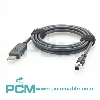
USB 3.0 A to Micro B Industrial Camera Cable :
Features Applications And Selection Guide
Explore USB 3.0 A to Micro B industrial camera cables for machine vision and image acquisition. Learn about connector compatibility, USB 3.0 signaling, shielding, cable length, and flexible routing, plus customization options for reliable data transfer and equipment integration.
Product Introduction

What Is a USB 3.0 A to Micro B Industrial Camera Cable?
The USB 3.0 Type A to Micro B industrial camera cable connects a compatible industrial camera to a computer or host device. It features a USB Type A connector at one end and a USB 3.0 Micro B connector at the other, providing a physical link for image acquisition and data transfer.
USB 3.0 has a nominal maximum signaling rate of 5 Gbps; actual performance depends on the camera, host, cable and system configuration.
USB 3.0 Micro B and USB 2.0 Micro B Are Not Automatically Interchangeable
USB 3.0 Micro B and USB 2.0 Micro B differ structurally and are not automatically interchangeable. For industrial cameras, compatibility affects mating and USB mode support.
Some models use screw locking Micro B connectors that must match the device's locking positions. Before replacing a cable, check the camera model, official documents, drawings, or original sample; do not rely on names or appearance alone.

How to Select the Right USB 3.0 A To Micro B Industrial Camera Cable ?
Confirm the camera model, distinguish USB 3.0 Micro B from USB 2.0 Micro B, check locking features and host USB 3.0 support. Choose cable length and connector orientation for routing and clearance. Performance depends on cable design, host bandwidth, and system configuration.
Core Product Value

◆ Dedicated Connectors for Direct Integration
The USB Type A to USB 3.0 Micro B configuration provides a defined link between compatible industrial cameras and host devices. Matching both ends simplifies assembly and can reduce the need for extra adapters.
◆ Designed for USB 3.0 Image Data Links
The cable is designed for USB 3.0 image data links, with conductor layout and terminations suited to the specified interface. It supports image acquisition when the camera, host, and system bandwidth are compatible.
◆ Shielding to Help Reduce Interference
An appropriate shielding design can help limit electromagnetic interference affecting the data link. Correct shield termination and grounding further support consistent operation around industrial equipment.
◆ Mechanical Support for Stable Connections
A well designed connector to cable transition helps manage stress from bending and pulling. Compatible locking features can also help maintain the mated connection when the camera provides matching retention points.

Product Customization Capabilities
Connector Options
Choose Type A and Micro B connectors, locking options, and cable exit direction.
Length and Routing
Plan cable length and routing for device spacing, clearance, and service access.
Cable and Shielding
Select conductors, shielding, insulation, and jacket materials for this project.
Dynamic Flexing
Specify high flex construction for motion, bend radius, and expected cable life.
Exit and Strain Relief
Customize cable exits and strain relief to reduce stress near connector outlets.
OEM Bulk Production
Plan OEM labels, packaging, and batch tracking; confirm MOQs and delivery dates.
Product FAQ
Can This Cable Carry Both Data and Power ?
Yes, if the camera and host support USB bus power. Available power depends on the host port, camera requirements, cable performance, and system design; check voltage and current before use.
Is This Cable Suitable for Continuous Image Capture ?
It can be used when the camera, host, and cable are compatible. For high resolution or high frame rate capture, test system stability and check for dropped frames or disconnections.
Does USB 3.0 Micro B Always Have Screw Locking ?
No. USB 3.0 Micro B identifies the interface, not the locking design. Check connector dimensions, screw positions, orientation, and clearance before choosing a replacement cable.
Why Might Image Transfer Be Interrupted ?
Interruptions may stem from loose connections, cable damage, interference, host limits, or driver issues. Check USB mode, software, and routing; test cable movement if faults occur during operation.