Hey there! I'm from a leading AISG cables supplier, and today I wanna chat about something super important: how to label AISG cables. Labelling cables might seem like a minor task, but trust me, it can save you a whole bunch of headaches down the road.
First off, let's understand why cable labelling is such a big deal. When you're dealing with a lot of AISG cables, which are used in telecom and other high - tech applications for controlling remote electrical tilt (RET) systems, it's easy to get lost in a sea of wires. Proper labelling helps in quick identification, troubleshooting, and maintenance. You don't want to spend hours trying to figure out which cable goes where when there's an issue, right?
What to Include on the Labels
The first step is deciding what information to put on the labels. At the bare minimum, you should have the cable type. For example, if it's an AISG RET Control Cable Assemblies Connector, clearly write that on the label. This tells you exactly what kind of cable you're dealing with and what its function is.


Next, add a unique identifier. This could be a serial number or a short code. Let's say you have a batch of cables installed in different parts of a telecom tower. The unique identifier helps you track each cable back to its origin, installation date, and even any previous maintenance records.
Another crucial piece of information is the source and destination. Write down where the cable starts and where it ends. For instance, if a cable runs from the base station equipment to a specific antenna, make sure that's noted on the label. This is incredibly helpful during both installation and when you need to replace or repair a cable.
Choosing the Right Labels
Now that we know what to put on the labels, let's talk about the labels themselves. You need labels that can withstand the environment where the cables are installed. Many AISG cables are outdoors, exposed to the elements like rain, sunlight, and extreme temperatures. That means you'll want labels made of durable materials, like weather - resistant polyester or vinyl.
These materials are tough, but they also need to stick well. Look for labels with strong adhesive. You don't want them falling off after a few weeks. Some labels are even designed to be resistant to chemicals, which can be handy if the cables are in an area where they might come into contact with cleaning agents or other substances.
Application of Labels
When it comes to actually applying the labels, there are a few key points to keep in mind. First, make sure the cable surface is clean and dry. Any dirt, dust, or moisture can prevent the label from sticking properly. You can use a mild cleaning solution and a soft cloth to clean the area where the label will go.
After cleaning, carefully align the label. You want it to be straight and in a visible position. Once aligned, slowly apply the label, starting from one end and pressing it down firmly as you go to avoid any air bubbles. Air bubbles can cause the label to peel off over time.
Some professional cable installers use cable labelling machines. These machines print the labels directly onto a special tape and then cut them to the right size. They offer a consistent and neat look, and they're great for large - scale cable installations.
Examples of Real - World Cables and Labelling
Let's take a look at some specific cables and how they should be labelled.
- Ericsson 6630 Power Cable RPM777 526: The label on this cable should clearly state the cable model (Ericsson 6630 Power Cable RPM777 526), its unique ID, the source (perhaps the Ericsson power supply unit), and the destination (e.g., a specific module in the telecom equipment).
- ZTE BBU 8200 8300 48V DC Power Cable: For this cable, label it with the cable's name, its voltage (48V DC), the starting point (ZTE BBU 8200 or 8300), and the endpoint (like a power - consuming device).
- Nokia FTCR OD Cable 471408A: On this cable, mark the cable type (Nokia FTCR OD Cable 471408A), the location of the network connection (e.g., from the Nokia router to a specific LAN port), and the unique number assigned to it.
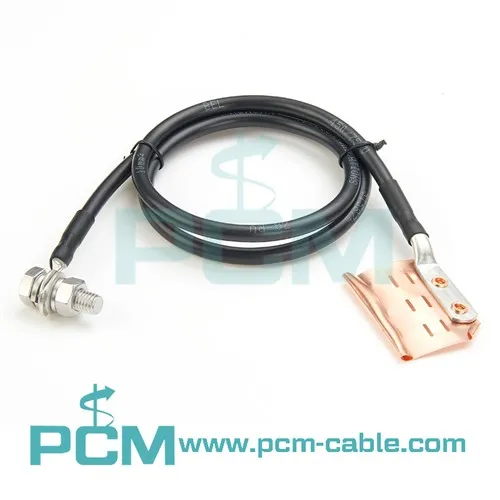
- Earthing Kits For RF Coaxial Cable: The label here should say what it is (Earthing Kits For RF Coaxial Cable), which coaxial cable it's connected to (using the cable's unique ID), and the grounding point.
Maintenance of Labelled Cables
Labelling isn't a one - time thing. As time goes on, labels can fade or get damaged. So, it's important to have a maintenance schedule for checking the labels. Every few months, walk around and inspect the cables. If you notice any labels that are peeling, fading, or otherwise damaged, replace them right away. This ensures that the valuable information on the labels remains accessible at all times.
Tips and Tricks
Here are some additional tips to make your cable labelling process even better. If you're working with a large number of cables, create a cable labelling plan in advance. This plan can map out where each cable goes and what the labels should say. You can also use different colors for different types of cables. For example, use red for power cables, blue for data cables, and green for control cables. This color - coding can make it even easier to quickly identify cable types at a glance.
Why Choose Our AISG Cables and Labelling Support
As a supplier, we not only offer high - quality AISG cables but also support in proper labelling. Our cables are top - notch, designed to meet the highest industry standards. And if you're not sure how to label them, we can provide guidelines and even help you with custom - made labels. We understand the pain of mislabelled or poorly labelled cables, and we're here to make sure that doesn't happen to you.
If you're in the market for AISG cables or need more advice on cable labelling, don't hesitate to reach out. Whether you have a small project or a large - scale installation, we're ready to assist. Good labelling is just one part of a successful cable system, and we're with you every step of the way.
References
- Telecommunications Industry Publications on Cable Management
- Manufacturer's Guidelines for AISG Cables