In the realm of audio engineering, snake cables play a pivotal role in ensuring seamless signal transmission between various audio devices. As a seasoned snake cables supplier, I've witnessed firsthand the challenges that users face in maintaining the integrity of these cables. From roadies navigating the rigors of live touring to studio engineers orchestrating complex multi - channel setups, protecting snake cables is crucial for long - term performance and cost - effectiveness. In this blog, I'll share my insights and practical tips on how to safeguard snake cables from damage.
Understanding the Vulnerabilities of Snake Cables
Before delving into protective measures, it's essential to understand what makes snake cables susceptible to damage. These cables are often long and multi - stranded, containing multiple conductors bundled together. The intricate design allows them to transmit multiple audio signals simultaneously but also makes them more prone to wear and tear.
One of the primary sources of damage is physical stress. During transportation and setup, snake cables can be bent, twisted, or compressed. Sharp bends can cause the internal conductors to break, leading to signal loss or interference. Additionally, the connectors on snake cables are delicate. Repeated plugging and unplugging can cause the pins to become loose or bent, resulting in poor connectivity.
Environmental factors also pose a threat to snake cables. Moisture can corrode the internal conductors and connectors, and extreme temperatures can cause the cable insulation to become brittle or expand, affecting the cable's performance.
Protective Measures During Transportation
Transportation is a critical phase where snake cables are at high risk of damage. The first step is to invest in a proper cable reel or storage case. A reel allows you to neatly wind the cable, preventing it from tangling and reducing the risk of accidental damage during handling. When winding the cable on the reel, make sure to do it evenly, avoiding tight loops that could stress the internal conductors.
If you're using a cable storage case, choose one that provides adequate cushioning. Foam inserts can protect the cable from impact during transit. Some cases are also designed with compartments for the connectors, keeping them safe from being bumped or bent.
Another important consideration is labeling. Clearly mark each end of the snake cable with its destination or function. This not only helps in quick and easy setup but also reduces the chances of mis - handling the cable during transportation and storage.
Best Practices for Installation and Setup
When setting up a snake cable, it's crucial to handle it with care. Avoid pulling the cable by the connectors, as this can cause the pins to break or loosen. Instead, grasp the cable body firmly and gently guide it into place.
Route the cable away from sharp edges and rough surfaces. For example, if you're running the cable across a stage, make sure it doesn't come into contact with any metal fixtures or equipment with sharp corners. This can prevent the cable insulation from being cut or scratched, which could expose the internal conductors.
Use cable ties or clips to secure the cable along its route. This not only keeps the cable organized but also reduces the risk of it being accidentally tripped over or pulled. However, make sure not to overtighten the cable ties, as this can damage the cable.
Maintenance and Regular Inspections
Regular maintenance is key to protecting snake cables. After each use, visually inspect the cable for any signs of damage, such as cuts, frays, or loose connectors. Check the integrity of the insulation and the condition of the pins on the connectors.
Clean the connectors regularly to remove any dust, dirt, or oxidation. You can use a contact cleaner specifically designed for audio connectors. Apply a small amount of the cleaner to a cotton swab and gently wipe the pins. This helps to maintain good electrical conductivity.
If you notice any damage during the inspection, address it immediately. Minor issues, such as loose connectors, can often be fixed with simple tools. However, for more severe damage, such as a broken conductor, it's advisable to replace the cable or have it repaired by a professional.
Storing Snake Cables Properly
Proper storage of snake cables is crucial for their long - term protection. When not in use, store the cables in a cool, dry place. Avoid storing them in areas prone to high humidity or temperature fluctuations, as this can damage the cable insulation and conductors.
If you're using a cable reel for storage, make sure to cover it to prevent dust from accumulating on the cable. You can also use a cable bag to store the cable when it's not on the reel. This provides an extra layer of protection against dust, dirt, and accidental damage.
Specific Considerations for Different Types of Snake Cables
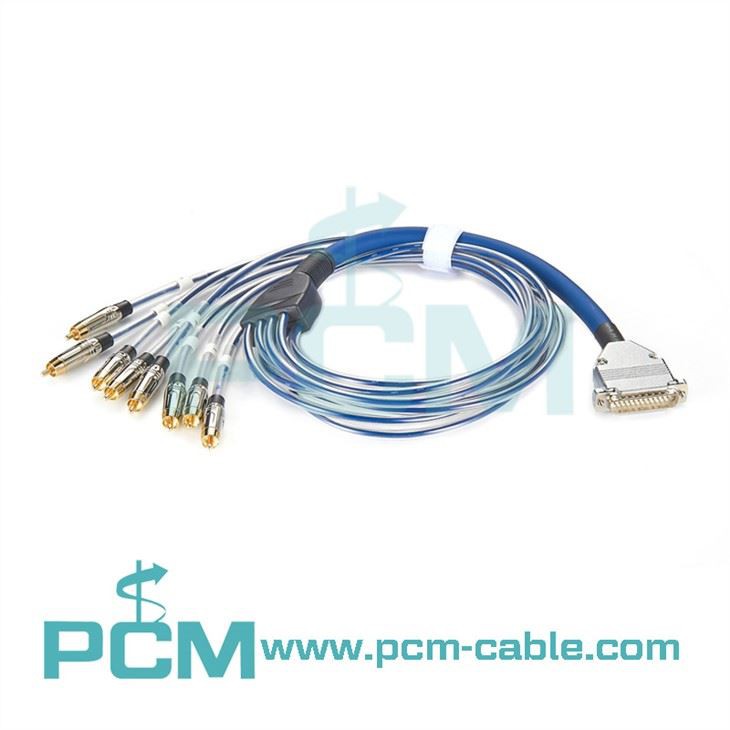
8 Channel RCA To DB25 Snake
The 8 Channel RCA To DB25 Snake is commonly used in audio setups that require the connection of multiple RCA devices to a single DB25 port. When handling this type of snake cable, pay special attention to the RCA connectors. These connectors are relatively small and can be easily damaged if not handled carefully. Make sure to insert and remove them gently to avoid bending the pins.

DB25 To 4XLR M 4XLR F Tascam Compatible Cable
The DB25 To 4XLR M 4XLR F Tascam Compatible Cable is designed for specific compatibility with Tascam equipment. Due to its specialized nature, it's important to use this cable only with compatible devices. When connecting and disconnecting the XLR connectors, hold them firmly at the base to prevent damage to the pins.
52 - 1335A XS Multi I O Box Cable
The 52 - 1335A XS Multi I O Box Cable is often used in multi - channel audio setups. This cable may have a more complex configuration, so it's essential to follow the installation instructions carefully. Make sure to protect the cable from excessive bending, especially near the connectors.
DB25 To RCA Snake
The DB25 To RCA Snake combines the DB25 and RCA connectors. Similar to other cables with RCA connectors, take extra care when handling the RCA ends. Additionally, ensure that the DB25 connector is properly seated in the device to maintain a stable connection.
RJ45 To XLR Cable 4 Channel
The RJ45 To XLR Cable 4 Channel is often used in modern audio setups that require network - based connectivity. The RJ45 connectors are more robust than RCA connectors but can still be damaged if not handled correctly. When inserting or removing the RJ45 connector, make sure to do it straight and without applying excessive force.
Conclusion and Call to Action
Protecting snake cables from damage is essential for ensuring optimal audio performance and maximizing the lifespan of your equipment. By following the tips outlined in this blog, you can significantly reduce the risk of damage and enjoy reliable audio transmission.
If you're in the market for high - quality snake cables or have questions about cable protection, I'd be more than happy to assist you. Feel free to reach out for more information and to start a discussion about your specific audio cable needs. Whether you're a professional audio engineer, a live event organizer, or a studio enthusiast, we can provide the right solutions for you.
References
- Professional Audio Equipment Handbook: A Guide to Audio Technology and Equipment Use.
- Audio Engineering Society Technical Papers on Cable Design and Maintenance.