As a USB cables supplier, I've encountered numerous customers facing the frustrating issue of their USB cables not charging their devices fully. This problem can be quite perplexing, but understanding the underlying causes can help you find a solution. In this blog post, I'll explore the common reasons behind incomplete charging and offer some tips on how to address them.
1. Cable Quality and Compatibility
One of the most common reasons for incomplete charging is the quality and compatibility of the USB cable. Not all USB cables are created equal, and using a low - quality or incompatible cable can significantly affect the charging process.
Low - Quality Cables
Low - quality cables often have thinner wires and poor insulation. Thinner wires increase resistance, which in turn reduces the amount of electrical current that can flow through the cable. As a result, your device may charge more slowly or not reach a full charge. For example, some cheap cables on the market are made with substandard materials that can't handle the power requirements of modern devices.

Incompatible Cables
Compatibility is also crucial. Different devices have different charging requirements, and using the wrong cable can lead to problems. For instance, some older USB cables may not support the fast - charging capabilities of newer devices. If you're using a cable that is not designed for your device's power input, it may not be able to deliver enough power to charge the device fully.
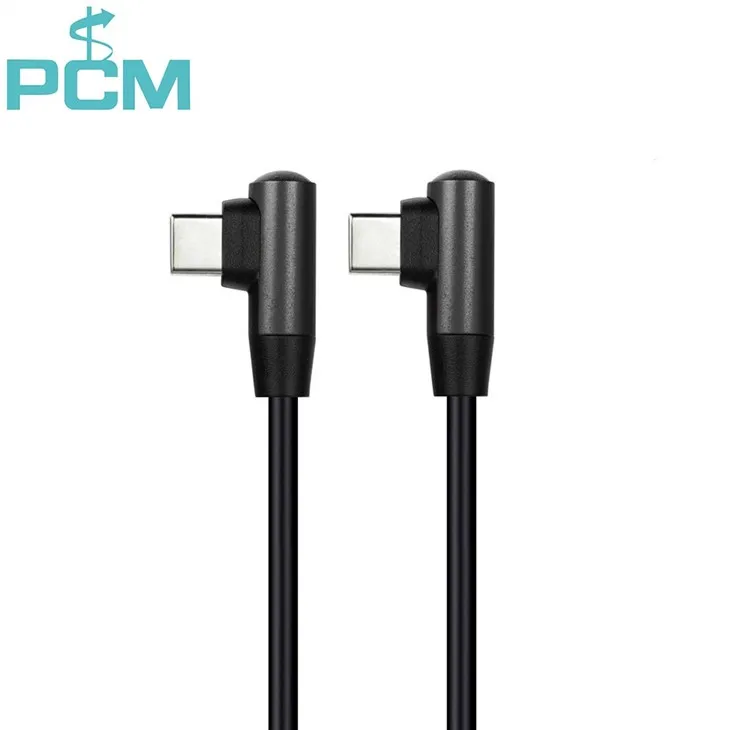
If you're looking for high - quality and compatible cables, we offer a wide range of options, such as the USB C To USB C Tether Cable. This cable is designed to provide a stable and efficient connection for charging and data transfer.
2. Charging Port Issues
The charging port on your device can also be a culprit. Over time, charging ports can become dirty, damaged, or loose, which can prevent the cable from making a proper connection.
Dirt and Debris
Dirt, dust, and lint can accumulate in the charging port, blocking the electrical contacts. This can disrupt the flow of power and prevent your device from charging fully. To clean the charging port, you can use a can of compressed air to blow out the debris gently. Be careful not to use sharp objects, as they can damage the port.
Physical Damage
Physical damage to the charging port, such as bent pins or a cracked housing, can also cause problems. If you've dropped your device or inserted the cable incorrectly, it's possible that the port has been damaged. In this case, you may need to have the port repaired or replaced by a professional.
Loose Connection
A loose connection between the cable and the charging port can lead to intermittent charging. This can happen if the port has become loose over time or if the cable is not properly seated. Try wiggling the cable gently while it's plugged in to see if the charging status changes. If it does, it may be a sign of a loose connection.
3. Power Source Problems
The power source you're using to charge your device can also affect the charging process.
Insufficient Power Output
Not all power sources are created equal. A power adapter with a low power output may not be able to provide enough power to charge your device fully. For example, if you're using a USB port on your computer to charge a large - battery device like a tablet, it may not be able to deliver enough power. Make sure you're using a power adapter that is rated for your device's charging requirements.
Faulty Power Adapter
A faulty power adapter can also cause charging problems. If the adapter is damaged or malfunctioning, it may not be able to provide a stable power supply. Check the adapter for any signs of damage, such as frayed cords or a cracked housing. If you suspect that the adapter is faulty, try using a different one.
We also offer reliable power - related cables like the USB 3.0 Active Extension Cable Repeater Cable, which can help you extend the reach of your power source while maintaining a stable connection.
4. Device - Specific Issues
Sometimes, the problem may be related to the device itself.
Software Glitches
Software glitches can sometimes interfere with the charging process. A bug in the operating system or a misconfigured charging setting can cause the device to stop charging prematurely. Try restarting your device to see if it resolves the issue. If the problem persists, you may need to update the device's software to the latest version.
Battery Health
The health of your device's battery can also affect its charging capacity. Over time, batteries degrade, and their ability to hold a charge decreases. If your device's battery is old or damaged, it may not be able to charge fully. You can check the battery health in your device's settings or use a third - party battery - monitoring app. If the battery health is poor, you may need to replace the battery.
5. Environmental Factors
Environmental factors can also play a role in the charging process.
Temperature
Extreme temperatures can affect the performance of your device's battery and the charging process. High temperatures can cause the battery to overheat, which can reduce its charging capacity and lifespan. On the other hand, very low temperatures can slow down the chemical reactions in the battery, making it charge more slowly. Try to charge your device in a moderate temperature environment.
Humidity
High humidity can also cause problems. Moisture can get into the charging port and cable, leading to corrosion and electrical shorts. If you're in a humid environment, make sure to keep your device and cables dry.
Tips to Ensure Full Charging
- Use High - Quality Cables: Invest in high - quality cables from a reputable supplier. Our USB - C 3.1 GEN2 Right Angle Type - C Cable is a great option for fast and reliable charging.
- Keep the Charging Port Clean: Regularly clean the charging port to prevent dirt and debris from accumulating.
- Use the Right Power Source: Make sure you're using a power adapter with the correct power output for your device.
- Check the Battery Health: Monitor the health of your device's battery and replace it if necessary.
- Charge in a Suitable Environment: Avoid charging your device in extreme temperatures or high - humidity environments.
Contact Us for Your USB Cable Needs
If you're still experiencing problems with your USB cables not charging your devices fully, or if you're looking for high - quality USB cables for your business or personal use, we're here to help. As a professional USB cables supplier, we have a wide range of products to meet your needs. Whether you need a cable for charging, data transfer, or other applications, we can provide you with the right solution. Contact us to start a procurement negotiation and find the best USB cables for your requirements.
References
- "USB Cable Standards and Compatibility", USB Implementers Forum
- "Battery Degradation and Charging", Journal of Electrochemical Society
- "Device Charging Troubleshooting Guide", Various device manufacturers' official documentation