Monitoring a system is a crucial task in various industries, from IT infrastructure management to industrial automation. One effective and reliable method for system monitoring is using a serial cable. As a serial cable supplier, I've witnessed firsthand the benefits and versatility of serial cables in different monitoring scenarios. In this blog post, I'll share how you can use a serial cable for system monitoring, covering everything from the basics to advanced applications.
Understanding Serial Cables
Before diving into how to use a serial cable for monitoring, it's essential to understand what a serial cable is. A serial cable is a type of cable used to transmit data one bit at a time sequentially. This is in contrast to parallel cables, which transmit multiple bits simultaneously. Serial cables are commonly used for communication between devices such as computers, servers, routers, and industrial equipment.
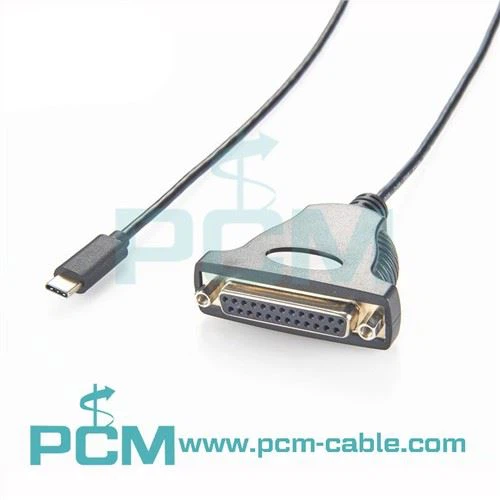
There are different types of serial cables, each designed for specific applications. For example, the USB To Serial and Parallel Adapter DB9 DB25 USB To Serial and Parallel Adapter DB9 DB25 is a popular choice for connecting devices with USB ports to serial or parallel interfaces. It provides a convenient way to convert between different communication standards, making it ideal for legacy equipment or devices that lack native serial support.
Another type of serial cable is the USB TO TTL Converter USB TO TTL Converter. This converter allows you to connect USB-enabled devices to TTL (Transistor-Transistor Logic) compatible devices, such as microcontrollers and sensors. It's commonly used in embedded systems development and DIY electronics projects.
The USB C To Null Modem Cable USB C To Null Modem Cable is designed for direct communication between two devices without the need for a modem. It's often used for connecting computers, routers, and other networking equipment for configuration and troubleshooting.
Preparing for System Monitoring
Before using a serial cable for system monitoring, you need to ensure that your system is properly configured. Here's a step-by-step guide on how to prepare:
- Check Compatibility: Make sure that the devices you want to connect are compatible with serial communication. Check the device specifications to determine the type of serial interface (e.g., RS-232, RS-422, RS-485) and the required voltage levels.
- Select the Right Cable: Choose the appropriate serial cable based on your device's requirements. Consider factors such as cable length, connector type, and shielding to ensure reliable data transmission.
- Install Drivers: If you're using a USB to serial adapter, you may need to install the appropriate drivers on your computer. Check the manufacturer's website for the latest driver updates and follow the installation instructions.
- Configure the Serial Port: On your computer, configure the serial port settings to match the device you're connecting to. This includes setting the baud rate, data bits, stop bits, and parity. You can usually do this through the device manager or a serial communication software.
Connecting the Serial Cable
Once you've prepared your system, it's time to connect the serial cable. Here's how:


- Power Off the Devices: Before making any connections, turn off the power to the devices to avoid electrical damage.
- Connect the Cable: Plug one end of the serial cable into the serial port of the monitoring device (e.g., computer) and the other end into the serial port of the device you want to monitor. Make sure the connectors are securely seated.
- Power On the Devices: After connecting the cable, power on the devices. Wait for them to boot up and initialize.
- Verify the Connection: Once the devices are powered on, use a serial communication software to verify the connection. You can send and receive test messages to ensure that data is being transmitted correctly.
Using Serial Monitoring Software
Serial monitoring software is a powerful tool that allows you to view and analyze the data transmitted over the serial cable. Here are some popular serial monitoring software applications:
- PuTTY: PuTTY is a free and open-source terminal emulator that supports serial communication. It's available for Windows, Linux, and macOS and provides a simple and intuitive interface for connecting to serial devices.
- Tera Term: Tera Term is another popular terminal emulator that offers advanced features such as macro recording, file transfer, and script execution. It's available for Windows and supports a wide range of serial communication protocols.
- RealTerm: RealTerm is a lightweight and easy-to-use serial communication software that provides a real-time view of the data transmitted over the serial cable. It's available for Windows and supports various data display formats.
To use serial monitoring software, follow these steps:
- Open the Software: Launch the serial monitoring software on your computer.
- Configure the Connection: In the software, configure the serial port settings to match the ones you set on your computer earlier. This includes the baud rate, data bits, stop bits, and parity.
- Connect to the Device: Click the "Connect" button in the software to establish a connection to the device you're monitoring.
- Monitor the Data: Once the connection is established, you can start monitoring the data transmitted over the serial cable. The software will display the data in a terminal window, allowing you to view and analyze it in real-time.
Advanced System Monitoring with Serial Cables
In addition to basic system monitoring, serial cables can also be used for more advanced applications. Here are some examples:
- Remote Monitoring: Serial cables can be used to establish a remote connection to a device for monitoring purposes. This is particularly useful for monitoring devices located in hard-to-reach or hazardous environments. You can use a serial-to-Ethernet converter or a serial wireless modem to transmit the data over a network or wirelessly.
- Data Logging: Serial monitoring software allows you to log the data transmitted over the serial cable for later analysis. This is useful for troubleshooting problems, analyzing trends, and generating reports. You can save the data in various formats, such as CSV, TXT, or XML.
- Automation and Control: Serial cables can be used to automate tasks and control devices. For example, you can use a serial cable to send commands to a robotic arm or a PLC (Programmable Logic Controller) to perform specific actions. You can use a programming language such as Python or Java to write scripts that communicate with the serial device.
Troubleshooting Serial Communication Issues
Serial communication can sometimes encounter issues, such as data errors, connection failures, or communication timeouts. Here are some common troubleshooting steps:
- Check the Cable: Make sure that the serial cable is properly connected and not damaged. Inspect the connectors for any signs of corrosion or loose pins.
- Verify the Settings: Double-check the serial port settings on your computer and the device you're monitoring. Make sure that the baud rate, data bits, stop bits, and parity match.
- Restart the Devices: Sometimes, simply restarting the devices can resolve communication issues. Turn off the power to the devices, wait for a few seconds, and then turn them back on.
- Update the Drivers: If you're using a USB to serial adapter, make sure that you have the latest drivers installed. Check the manufacturer's website for driver updates and install them if necessary.
- Use a Different Cable or Port: If the problem persists, try using a different serial cable or a different serial port on your computer. This can help determine if the issue is with the cable or the port.
Conclusion
Using a serial cable for system monitoring is a reliable and cost-effective solution. Whether you're monitoring a computer system, a network device, or an industrial machine, serial cables offer a simple and efficient way to transmit data and perform real-time monitoring. As a serial cable supplier, I can provide you with high-quality serial cables and accessories to meet your monitoring needs.
If you're interested in learning more about using serial cables for system monitoring or if you're looking to purchase serial cables for your project, please don't hesitate to contact us for a consultation. We're here to help you find the right solutions for your specific requirements.
References
- Hayes, J. F. (1988). Introduction to Data Communications and Networking. Addison-Wesley.
- Stallings, W. (2017). Data and Computer Communications. Pearson.
- Tanenbaum, A. S. (2011). Computer Networks. Pearson.