Hey there! As a supplier of RS232 cables, I often get asked about the nitty - gritty details of these cables, and one question that pops up quite frequently is: "What is the maximum number of pins in an RS232 cable connector?" Let's dive right into it.
The Basics of RS232
First off, RS232 is a standard for serial communication transmission of data. It's been around for ages, and even though we've got a ton of newer technologies out there, it still holds its ground in many industrial and legacy systems. RS232 cables are used to connect devices like computers to modems, or industrial equipment to control systems.
Pin Configurations in RS232 Connectors
The most common RS232 connectors come in two main types: the 9 - pin and the 25 - pin connectors. The 9 - pin connector, also known as DB9, is super popular these days. It's smaller and more compact, which makes it a great choice for modern devices where space is at a premium. You'll find them on laptops, some industrial control panels, and various communication devices.
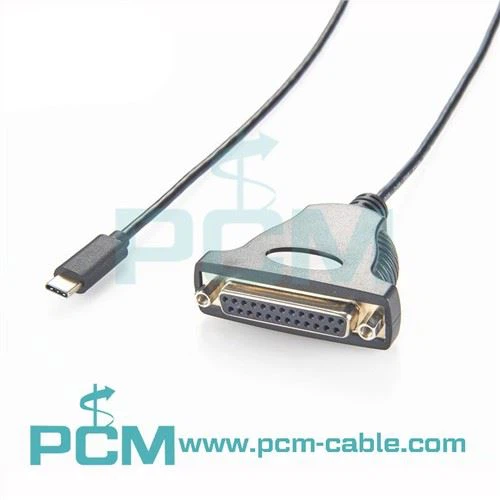
On the other hand, the 25 - pin connector, or DB25, was more prevalent in the earlier days of computing. It was used for things like connecting printers, modems, and other external devices to computers. But as technology advanced and the need for smaller, more efficient connectors grew, the 9 - pin connector started to take over.
So, What's the Maximum Number of Pins?
Technically, the maximum number of pins in a standard RS232 cable connector is 25. The DB25 connector has 25 pins, each with a specific function. These functions range from transmitting and receiving data to providing signals for things like flow control.
However, in practical applications, you might not always need all 25 pins. In fact, most modern systems can get by with just a few of the pins. For example, in a simple data transfer setup, you might only need the transmit data (TXD), receive data (RXD), and ground (GND) pins. That's why the 9 - pin connector became so popular, as it includes the essential pins for basic communication.
Why You Might Not Need All 25 Pins
The reason many systems don't use all 25 pins is because of the evolution of technology. As devices became more intelligent and self - regulating, the need for complex flow control and other signals decreased. Also, using fewer pins means less wiring, which can reduce the cost of manufacturing and the complexity of the cable installation.
For instance, in a local area network setup where you're using an RJ45 Female To 4 Pin Housing Cable, you're focusing on a different type of communication standard. This cable is designed for specific applications where the RS232's 25 - pin configuration might be overkill.
Other Considerations
When choosing an RS232 cable, it's not just about the number of pins. You also need to consider things like the cable length, the quality of the insulation, and the type of shielding. A longer cable might require better shielding to prevent signal interference. And if you're using the cable in a noisy industrial environment, you'll definitely want a cable with good insulation to ensure reliable data transmission.
We also offer a USB B Round Panel Mount Extension Cable for those who need to extend their USB connections. This cable is great for adding more flexibility to your device setup, especially when you're dealing with panel - mounted devices.
Another option we have is the M12 Y Splitter Cable. This cable is useful in sensor and industrial automation applications, where you might need to split a single signal into multiple outputs.


Conclusion
In conclusion, while the maximum number of pins in an RS232 cable connector is 25, most modern applications can function perfectly fine with a 9 - pin connector. The choice between the two depends on your specific needs, the type of devices you're connecting, and the environment in which the cable will be used.
If you're in the market for RS232 cables or any of our other cable products, we'd love to hear from you. Whether you need a custom - length cable, a specific pin configuration, or just some advice on which cable is right for your project, we're here to help. Feel free to reach out to us to start a conversation about your cable requirements. We're confident that we can provide you with high - quality cables that meet your needs and budget.
References
- "Serial Communication Handbook" by some tech experts
- Industry standards documents on RS232 and related cable technologies