Hey there! I'm a supplier of serial cables, and I often get asked by customers, "How do I identify a serial cable?" Well, let me break it down for you in this blog post.


First off, it's important to understand what a serial cable is. A serial cable is used to transmit data between two devices in a sequential manner. It's been around for ages and is still widely used in various industries, from industrial automation to computer peripherals.
Physical Appearance
One of the easiest ways to identify a serial cable is by looking at its physical appearance. Serial cables come in different shapes and sizes, but there are some common features you can look out for.
Connector Types
Serial cables typically have one of the following connector types:
- DB9 Connector: This is one of the most common connector types for serial cables. It has 9 pins arranged in a D-shaped connector. You'll often find this type of connector on older computers and some industrial equipment. For example, if you're trying to connect an old external modem to your computer, chances are it'll use a DB9 serial cable.
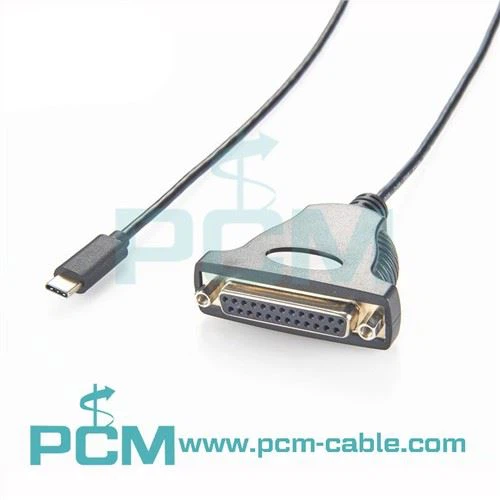
- DB25 Connector: Similar to the DB9, but with 25 pins. It was more commonly used in the past, especially for printers and some mainframe connections. Although it's not as prevalent today, you might still come across it in some legacy systems.
- RJ45 Connector: This is the same type of connector you see on Ethernet cables. However, in the context of serial cables, the 8P8C RJ45 COM Serial Cable uses the RJ45 connector to transmit serial data. It's becoming more popular due to its compact size and ease of use.
Cable Color and Jacket
The color of the cable and its jacket can also give you some clues. Serial cables often come in standard colors like black, gray, or white. The jacket material can vary, too. Some cables have a flexible PVC jacket, while others might have a more rugged nylon or rubber jacket, depending on their intended use. For example, cables used in industrial environments are likely to have a more durable jacket to withstand harsh conditions.
Function and Compatibility
Another way to identify a serial cable is by understanding its function and compatibility with your devices.
Data Transmission Rate
Serial cables support different data transmission rates, measured in bits per second (bps). Common rates include 9600 bps, 115200 bps, and even higher. You need to make sure the cable you choose can support the data transmission rate required by your devices. For instance, if you're using a device that requires a high-speed data transfer, you'll need a cable that can handle that rate.
Protocol Support
Serial cables can support different communication protocols, such as RS-232, RS-422, and RS-485. Each protocol has its own characteristics and is used in different applications.
- RS-232: This is the most widely used serial communication protocol. It's suitable for short-distance communication between devices, typically up to 50 feet. You can find many devices, like barcode scanners and some older printers, that use RS-232 serial cables.
- RS-422: It's an improvement over RS-232, allowing for longer-distance communication and higher data transfer rates. RS-422 is often used in industrial automation and some networking applications.
- RS-485: Similar to RS-422, but it can support multiple devices on the same cable. This makes it ideal for applications where you need to connect multiple sensors or devices in a network. If you're looking for a cable that supports RS-485, check out the USB To RS485 Serial Interface Cable Wire Ended.
Device Compatibility
Before you buy a serial cable, you need to make sure it's compatible with your devices. Check the device's manual or specifications to see what type of serial connection it requires. Some devices might only support a specific type of connector or protocol. For example, if you're trying to connect a USB device to a serial port, you'll need a Prolific USB To Serial USB Cable.
Testing the Cable
If you're still not sure if a cable is a serial cable or if it's working properly, you can test it.
Visual Inspection
First, do a visual inspection of the cable. Look for any signs of damage, such as frayed wires, bent pins, or cracked connectors. If you see any of these issues, the cable might not work correctly and should be replaced.
Using a Multimeter
You can use a multimeter to test the continuity of the cable. Set the multimeter to the continuity mode and touch the probes to the pins at both ends of the cable. If the multimeter beeps, it means there's a continuous electrical path, indicating that the cable is likely working.
Testing with Devices
The best way to test a serial cable is to connect it to your devices and see if they communicate properly. If you're having trouble getting the devices to communicate, it could be a problem with the cable, the devices themselves, or the settings.
Conclusion
Identifying a serial cable isn't rocket science, but it does require some knowledge of its physical appearance, function, and compatibility. By looking at the connector types, cable color and jacket, data transmission rate, protocol support, and testing the cable, you can easily figure out if a cable is the right one for your needs.
If you're in the market for a serial cable, we've got you covered. We offer a wide range of high-quality serial cables, including the ones mentioned in this blog post. Whether you need a USB to serial cable, an RJ45 serial cable, or something else, we can provide the right solution for you.
If you have any questions or want to discuss your specific requirements, don't hesitate to reach out. We're here to help you find the perfect serial cable for your applications.
References
- "Serial Communication Basics" - Various online resources
- Device manuals and specifications from different manufacturers