If you’ve ever worked with ZigBee technology—whether in smart home devices, industrial automation sensors, or wireless mesh networks—you know that reliable signal strength is non-negotiable. The ZigBee standard operates on the 2.4 GHz ISM band (and sub-GHz bands in some regions), where even small signal losses can lead to dropped connections, delayed data transfers, or gaps in your mesh. As an RF jumper cable supplier, I get asked this question all the time: Can RF jumper cables be used in ZigBee gateways? The short answer is yes—but only when you pick the right cable for the job. Let’s break down why that is, what to look for, and how our RF solutions fit seamlessly into ZigBee gateway setups.
First, let’s ground this in how a ZigBee gateway works. A typical gateway acts as the bridge between ZigBee end devices (like smart thermostats, motion sensors, or industrial monitoring nodes) and a local network or cloud. It has two core components: a ZigBee radio module (which transmits and receives 2.4 GHz signals) and an antenna, which is either integrated into the gateway or mounted externally. If the antenna is external, it connects to the radio via a small RF jumper cable—this is where these cables come into play. Even integrated antennas can sometimes benefit from a jumper cable, though that’s less common. The main goal here is to extend the antenna’s placement to a higher, unobstructed spot (like on a roof or a wall) instead of tucking the gateway away in a cabinet or basement, where walls and metal surfaces can block signals.
But here’s the thing: not all RF jumper cables are created equal, and using the wrong one for ZigBee can do more harm than good. ZigBee signals are relatively low-power compared to cellular or Wi-Fi, so even a few decibels of signal loss from a poor-quality cable can shrink your network’s range by 20% or more. That’s why as a supplier, we prioritize cables with low insertion loss, proper shielding, and reliable connector interfaces—all critical for 2.4 GHz ZigBee operation.
Let’s talk about the key factors to consider when choosing an RF jumper cable for a ZigBee gateway. First, frequency compatibility. Since ZigBee operates on 2.4 GHz, your cable must be rated for at least that frequency range. Many lower-cost jumper cables are designed for older technologies, like 2G or 3G, and don’t perform well at 2.4 GHz—they have higher loss and can cause signal degradation. That’s why all our RF jumper cables are tested to deliver consistent performance across the 2.4 GHz ISM band, making them ideal for ZigBee.
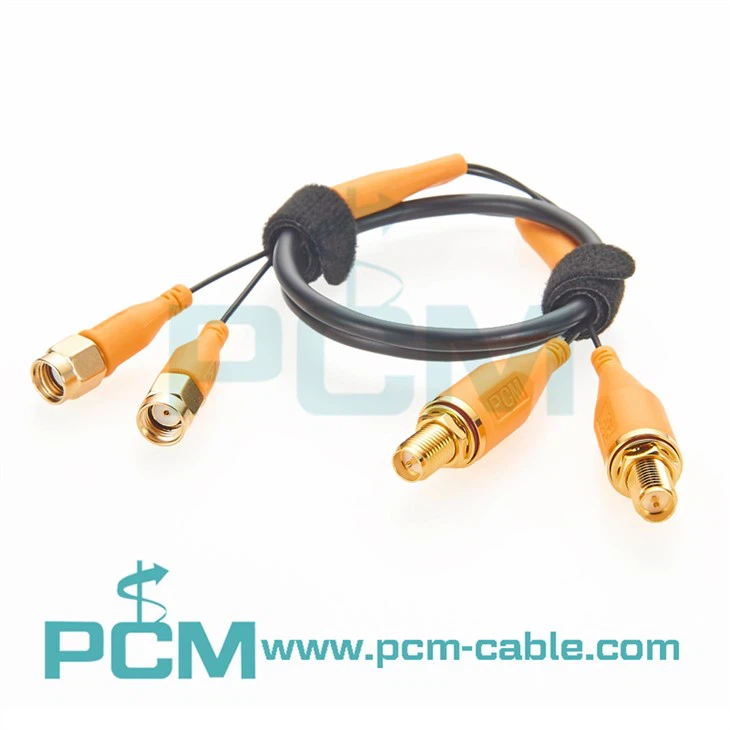
Second, connector type. ZigBee gateways and antennas use a range of connectors, so matching the cable’s connectors is non-negotiable. The most common connectors for ZigBee are SMA (SubMiniature version A), U.FL, and TS9—though SMA is by far the most popular for external antennas. For example, many ZigBee gateways have an SMA port for an external antenna, so a jumper cable with SMA connectors on both ends would work. But sometimes you need to extend an existing antenna, or connect a gateway’s internal module to an external antenna port on the gateway’s case. That’s where our 2-in-1 SMA Male To Female Antenna Extension Cable, 2x2 MIMO Cable Assembly comes in handy. This dual-cable assembly is designed for MIMO setups, which are becoming common in ZigBee gateways to boost range and reliability. The male-to-female design lets you extend an existing antenna without modifying it, perfect for mounting the antenna outside a metal cabinet that would otherwise block signals.
Another connector we often recommend for ZigBee setups is TNC (Threaded Neill-Concelman). Some industrial ZigBee gateways, which are built for harsh environments, use TNC connectors instead of SMA because they offer better water resistance and vibration resistance. If you have a gateway with a TNC port, our UHF RFID Cable TNC To SMA cable is a great option—though keep in mind that even though this is marketed for UHF RFID, it works perfectly at 2.4 GHz for ZigBee. The TNC-to-SMA interface lets you connect a TNC-compatible antenna to your gateway’s SMA port, or vice versa, giving you flexibility in antenna and gateway pairing.
Third, cable length. This is a balance: a longer cable gives you more flexibility to place the antenna in a good spot, but too much length adds signal loss. For 2.4 GHz ZigBee, we generally recommend keeping jumper cables under 5 meters (16 feet) if possible, but that depends on the cable’s build quality. Our SMA cables use low-loss dielectric materials (like PTFE) and thick copper conductors, so a 5-meter cable will only have about 1 dB of loss at 2.4 GHz—hardly noticeable for ZigBee, which requires only small signal margins to operate reliably. If you need even longer lengths, we can custom-build cables with even lower loss to minimize performance impact.


Now, let’s address a common misconception: some people think that RF jumper cables are just “wires with connectors” and that any generic cable will work. That’s not true for ZigBee. These low-power networks rely on consistent signal strength, and a cheap, unshielded jumper cable can pick up noise from other devices (like Wi-Fi routers, Bluetooth speakers, or microwave ovens) that operate on the same 2.4 GHz band. That noise can cause packet loss, which is a big problem for ZigBee, where reliability is everything—especially in industrial settings where sensors might be monitoring machinery or safety systems. Our RF jumper cables have a double-shielded design (aluminum foil plus braided copper) that blocks external noise, keeping your ZigBee signals clean and interference-free.
Another useful component for ZigBee gateways is a SMA panel mounting coupler. If your gateway is recessed into a wall or a metal panel, you might need a way to mount an external antenna securely to the panel, extending the SMA port so the antenna can be attached without straining the gateway’s internal connector. Our SMA Panel Mounting Coupler is designed for exactly that—it lets you connect two SMA cables, or a cable and an antenna, while providing a sturdy mounting point for the panel. This is especially important for outdoor ZigBee gateways, which need to withstand wind and weather without loose connections.
What about attenuation? Wait, do you ever need an attenuator in a ZigBee gateway? That’s a good question. Attenuators reduce signal strength, which might sound counterintuitive, but sometimes a gateway’s radio module can output too much power, leading to signal reflection that causes distortion, or even damage to the antenna if the power is too high. For ZigBee, which is low-power, this is rare, but in some cases where you’re pairing a high-gain antenna with a gateway’s radio, a small attenuator can help optimize performance. Our N-Type Fixed Attenuator N-Type Jack To Plug is built for higher-power applications, but if you have an industrial ZigBee gateway with an N-Type port, it’s a solid option to fine-tune signal levels. For most residential or small-scale commercial ZigBee setups, you won’t need an attenuator—stick to a quality jumper cable and antenna, and you’ll be fine.
Let’s walk through a real-world example to make this concrete. Suppose you’re setting up a ZigBee mesh network in a large warehouse. Your gateway is located in a utility closet on the first floor, but metal racks and concrete floors block signals to the second floor, where you need sensors monitoring inventory. You have an external SMA antenna that you want to mount on the roof of the warehouse, 15 meters away from the gateway’s SMA port. A generic jumper cable would probably have too much loss at that length, leading to weak signals on the second floor. Instead, you’d use our low-loss SMA male-to-female extension cable, which is rated for 2.4 GHz and has very little loss over 15 meters. You can pair it with a SMA panel mounting coupler to run the cable through the warehouse’s roof without damaging the waterproof seal, and attach a high-gain outdoor antenna to the other end. Suddenly, your second-floor sensors get strong, reliable signals, and your mesh network works seamlessly.
Another example: a small business setting up a smart office with ZigBee lighting controls, motion sensors, and a gateway tucked under a desk. The metal desk blocks the gateway’s internal antenna, so signal strength drops off near the office’s perimeter. Instead of moving the gateway, you can use a short TS9 male-to-female cable to connect the gateway’s internal radio module to an external SMA antenna mounted on the wall above the desk. Wait, TS9? That’s a common connector for cellular modems, but some ZigBee gateways use TS9 for their internal antenna ports. Our TS9 Male To Female Cable is compatible with 2.4 GHz, so it works perfectly here—you just need an adapter to go from TS9 to SMA to connect the external antenna. This is a quick, low-cost fix that boosts your office’s ZigBee coverage without rearranging your setup.
Now, let’s talk about installation tips to ensure you get the most out of your RF jumper cable for ZigBee. First, keep the cable away from other power cables or high-frequency devices—this will reduce noise interference. Second, avoid bending the cable too sharply; most RF jumper cables have a minimum bend radius (usually 5-10 times the cable’s diameter), and bending beyond that can damage the internal conductors or shielding, leading to higher loss. Third, make sure all connectors are tightened properly—loose connections are one of the top causes of signal loss in ZigBee setups. If you’re working with outdoor cables, use weatherproof connectors or seal the connections with electrical tape to prevent water damage, which can corrode pins and cause intermittent signal issues.
As an RF jumper cable supplier, we’ve worked with hundreds of customers to customize solutions for their ZigBee gateways, from smart home devices to industrial IoT systems. We’ve found that the biggest mistake people make is choosing a cable based on price alone. A $5 generic jumper cable might seem like a good deal, but it could cause enough signal loss to cut your ZigBee network range in half, leading to a lot of headaches when sensors stop communicating. Investing in a quality RF jumper cable from a reputable supplier like us pays off in reliable, long-term performance.
If you’re setting up a ZigBee gateway and aren’t sure which RF jumper cable is right for your needs, don’t hesitate to reach out. Our team of RF engineers can help you select the perfect cable, whether you need a short extension for a small office or a long, low-loss cable for an industrial warehouse. We also offer custom cable assemblies if you have unique connector requirements or length needs that our standard products don’t cover.
References:
- ZigBee Alliance. (2021). ZigBee Specification: Wireless Mesh Network for IoT Applications.
- Federal Communications Commission. (2020). Part 15 Rules for the 2.4 GHz ISM Band.
- Institute of Electrical and Electronics Engineers. (2018). IEEE 802.15.4 Standard for Low-Rate Wireless Personal Area Networks.
- RF Technology Association. (2022). Insertion Loss and Shielding Requirements for 2.4 GHz Wireless Cables.